Showing posts with label SQL. Show all posts

Sunday, April 17, 2016

Relational Algebra - An Intro of it's Use and Operators


Consider the following database scenario:
You are planning a high school graduation party for the school. You keep data on those who have registered to be present on that day. We have students(S), teachers(T), staff members(SM), parents(P), and siblings(C) of the students, followed by relatives(F), and a list of registered people for the party(R). We also have information about food allergies(A). If we were asked to find out the group of people who is a 25 years old or older and a parent of a student who has a peanut allergy, what would you query?

SELECT S.name
FROM S
WHERE S.allergy='peanut' and S.parent=
               (SELECT P.name
                FROM P
                WHERE P.age >= 25)
As we can see here this is not the simplest query. Imagine if we had to query for something way more complex than this. Would you sit there and try things out until you got the right query? Would a database always have someone behind it entering queries? Not always(Probably not). It can be done of course, but there's a better solution for this.

Relational Algebra: relational algebra is a way of expressing relations. Just like algebra is a way of expressing numbers and their relations, relational algebra is a way of expressing things in a database with their set of operators. It can also be used to describe constraints of a database, though we'll elaborate on that in another post.


Relational Operators: relational operators are analogous to arithmetic operators; they operate on a certain operand and describes the operands' relationship to each other. Below we will jump into some of the basic operators.

1. Selection(σ): Like in SQL queries we are selecting a subset of rows from a relation(operand)
2. Projection(π): Keeps certain column(s) of a relation, I don't think this has an SQL counterpart
3. Cross-product(×): Also called Cartesian product. This takes relations and combines them
4. Join(⋈): Connects two relations with some sort of condition
5. Set-difference(−): an existing tuple(s) in one relation but nonexistent in another relation
6. Union(∪): Tuples that exist in one relation OR another relation. Realize that the "or" I'm talking about is logical or.
7. Intersection(∩): Tuples that exist in both of two relations
8. Renaming(\rho): renames a relation or an attribute.

Operator Examples:
1. Selection(σ) & Projection(π): All of those who have a peanut allergy from the student list(S)
πS.nameallergy='peanut'(S))

3. Cross-product(×): All of those who have peanut allergy and are a student or teacher
πS.nameallergy='peanut'(S × T))

4. Join(⋈) All of those who have peanut allergy and are a student or teacher
πS.nameallergy='peanut'(S ⋈ T))

5. Set-difference(−): find the students who have an allergy but did not reserve a place for the party
πS.nameallergy='peanut'(S)) - πS.name(R)

6. Union(∪) & Renaming(\rho): The list of students and teachers that have a name of "Sara"
πR.nameR.name='sara'(\rho(R , (S ∪ T))))

7. Intersection(∩) & Renaming(\rho): The list of people who's name is "sara" and is both a parent and a teacher
πR.name(σ R.name='sara' (\rho(R , (P ∪ T))))


Friday, March 11, 2016

MySQL Queries and commands


In this post I hope to go through some MySQL commands that would help users get started and used to using it. Remember that semicolons are default used to show end of command/queries.

Creation/Deletion Commands

USE <database name>:
This is used to enter an existing database.

CREATE DATABASE <database name>:
This is used to create a database.

CREATE TABLE <table name> <name of variable, variable type>:
This is really similar to database creation, although it has many more entries for each attribute. Here are some commonly used ones:

  • CHAR(N), where N is length between 1-255. Default is 1
  • VARCHAR(N), where N is length between 1-255. Unlike CHAR, you must define a length.
  • INT, an integer entry. The number should be between -2147483648 and 2147483648. If you need a bigger number, you can use
  • BIGINT the integer max depends on signed or unsigned.
SHOW TABLES:
Shows all available tables in a database

SHOW DATABASES:
Shows all existing databases in MySQL

DESCRIBE <table name>:
This shows how you've defined the table, what variables and types.

DROP TABLE <table name>:
This totally deletes the table, if it exists of course.

DROP DATABASE <database name>:

This deletes an existing database

Query Commands

SELECT * FROM <table name> WHERE <some condition>:
Select *  means it finds some table and return everything. If you want to find something specific you would do SELECT <attribute name> FROM <table name>  and if you want to return pairs of things you can specifiy the attributes with commas.
Ex.  SELECT name, age FROM attendees WHERE age > 20;

FROM describes where you are searching/querying.
WHERE is specifying conditions, you can specify several conditions in separated AND or OR.

AND:
The and keyword is used to specify that the combined conditions must all be satisfied.
Ex.  SELECT name, age FROM attendees WHERE age > 20 AND age < 30;

OR:
The or keyword is used to specify that one of the combined conditions must be satisfied.
Ex.  SELECT name, age FROM attendees WHERE age > 20 OR age < 10;

These are just the few basic commands/queries that you can do, and I hope that this helps you get started with building a database! I also plan to publish a post that goes into more queries, since most database management concepts are about these queries.

Friday, February 5, 2016

Database Concepts - A Short Post about the Relational Database Model

via Wikipedia


Relational Database Model:
The relational database model, different from the entity relation model, shows specific data and information about a database table. A relational database model contains two parts: An instance, and a Schema.

Schema:
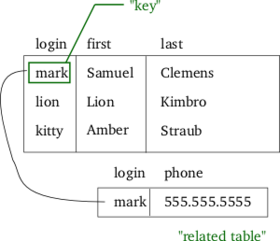
The schema is specific name of the relation, or the name of each column. If you think back to the Entity-Relationship Diagrams, there are names that have relationships to each other, these names would be the part of the schema. In the above picture, the schema would be the part that says "login", "first", and "last."

Instance:
The instance are the rows of data that pairs with the schema. In the above picture, the instance would be the rows of names.

Relations:
As you can see from the image above, the specific row of information for "Mark" is linked to another table that contains the specific key's phone number. This, is what the Entity Relationship Diagram has drawn out; the connection between one login key to a foreign key.

Usage:
With the Relational Database, we can use query language to query for data. Although our queries can be efficient, the DBMS is mostly responsible for making queries efficient.

Wednesday, February 3, 2016

Setting Up MySQL


Hi Everyone!

I know I haven't been posting much these past few months, I was busy with many other things and I decided to take a breather with blogging. However, things have cleared out of my way now, and I will start again with posts.

Installing:
For Linux users, type the following into your command line:

shell>sudo apt-get install mysql-server
shell>sudo apt-get install mysql-client

For Mac and Windows users, you have to download the installer here. Make sure you check 32 or 64 bit! Follow the steps that the install gives, and you should be fine!

Using MySQL:
To start up MySQL:  type the following commands in the terminal:
shell>mysql -u root -p
It would ask you for your password, since you need to be the root user. The installation should ask for you to set a password for MySQL, which is optional. If you do not wish to set a password, you can just click enter when it prompts you to type in a password.

If you did not set a password for MySQL, you can disregard the "-p" part. You can also just type it and click enter when it asks for a password. If you get in, you should see something like this:
Welcome to the MySQL monitor.  Commands end with ; or \g.
Your MySQL connection id is 1
Server version: 5.6.27 MySQL Community Server (GPL)
Copyright (c) 2000, 2015, Oracle and/or its affiliates. All rights reserved.
Oracle is a registered trademark of Oracle Corporation and/or its
affiliates. Other names may be trademarks of their respective
owners.
Type 'help;' or '\h' for help. Type '\c' to clear the current input statement.
mysql>
For Windows users, here's the way to start it up. I haven't tried this but I hope it helps.

To create a database: type the following in the MySQL command line:

mysql>create database database_name;

Notice here that you need a semicolon to show that you're done talking. We'll see later how that semicolon can be changed to something else.

To go into a database: type the following in the MySQL command line:

mysql>use database_name;
type in "mysql --help" in you're computer terminal to see many, many other commands.


Changing MySQL Password:
In order to change your MySQL password you will need to log onto MySQL first. After that you type the following:
mysql>grant all privileges on *.* to root@localhost identified by "new_password";
Here, the new_password should be in the quotes.

Changing the Terminator Symbol:
The semicolon at the end of each command is usually called the terminator, which tells MySQL that you're done with a statement. But what if you wanted to paste a big chunk of commands? Or paste in a function? You can change the terminator symbol before you paste code, and change it back to semicolon afterwards. Here's how to change it:

mysql>DELIMITER YOUR_TERMINATOR

example: mysql>DELIMITER done

In this example, assuming you don't have the word "done" in your code, will end your set of commands when it find the word "done." To change it back to semicolon you would do the same except with a ";"

That's it! Pretty Simple huh? If you have any problems look it up, many people may have the same problem. You can also feel free to post a comment here, and please do so if my post here helped you! I really appreciate knowing that I have helped! 'Til next time.


*It also seems that the spacing of this post is really odd, I'm trying to fix it but I haven't figured out the cause so far.

Friday, December 4, 2015

Database concepts - ER Diagrams (Continued)


So, in the last post I went over a little about how things are represented in an ER diagram, as well as the reasons to why using an ER diagram is helpful to design a good database. In this post, we'll elaborate on specific rules and guidelines that should be followed ad considered when creating an ER Diagram along with more information on relationships. Let's get started!

The basic setup of the ER diagram is formed in the first post, but there are Integrity constraints that need to be established.
Entity Integrity:
The entity integrity constraints states that a primary key of an entity cannot be NULL. NULL means that the value is unknown. The reason behind this is that specific rows of an entity is identified by the primary key(previous post), and if there is no primary key, then there is no way to identify it.

Referential Integrity:
The referential integrity constraint states a specific constraint between two tables. The primary table's records must exist in order for another table to reference that record.

For example, John sells a used car to Adam. The license of this car is 00A154.
In the Car table, there would first exist an record of this car:
    (License, Year, Model, Manufacturer) --> (00A154,  2014, Civic, Honda)

In the Sells table, there would then exist an entry:
    (Salesman, Client, Car) --> (John, Adam, 00A154)

1. If John were to change this record in table Car to (00B154, 2014, Civic, Honda), the Sells table would not be able to locate a record of 00A154.

2. If John were to delete the record in table Car, the Sells table would also not be able to locate a record of 00A154.

3. If John accidentally inserted the Sells record incorrectly say (John, Adam, 00B154), then when the Sells table try to locate Car 00B154 and it's information, the records would not be able to find it.

4. However, John can insert the Sells record as (John, Adam, NULL).

Foreign Integrity:
Foreign integrity constraints help solve the first two problems we have with the Referential Integrity Constraints.

Cascade Update:
Any time the primary table's record is changed, anything that references it must also be changed. That way there would not have mismatching records when we try to locate the reference.

Cascade Delete:
Any time a primary table's record is deleted, anything that references it must also be deleted. That way there would not have unfound records.


Relationship Constraints: There are key constraints, One-to-One, One-to-Many, and Many-to-Many. Then, there are participation constraints.

One-to-One: One to one means that an entity can at most be related one entity. For example, a man can be married to one woman, and vice versa. Sometimes there would also be specific ranges on the line specifying the relationship as [1:1]. This would be denoted by an arrow:

Man --> marries <-- Woman

One-to-Many:  Let's say in a case that a man can marry many women, but a woman can only marry one man. Sometimes there would also be specific ranges on the line specifying the relationship as [1:N]. The relationship would be a One-to-Many, expressed as the following:

Man -- marries <-- Woman

Many-to-Many: Many-to-Many are represented like the diagram above, just a thin line.

Mechanic -- Repairs -- Car

Participation Constraints: If we want to create a database where everyone must be married, then we would have a participation constraint. The arrows are still present to represent the One-to-One relation, and the line is thickened to show that records MUST be married couples.

Man --> marries <-- Woman

Saturday, November 21, 2015

Database Concepts - The Entity-Relationship Diagram


Via texample.net

In this post I will try to start database ideas with modeling. Here, I will explain what an ER diagram is and how it is used as a database model. In future posts I will explain more into detail of database ideas once I have established a basic bridge. Lets get started!


In order to continue understanding clearly upcoming concepts we need to first establish some more basic basic basic terms:

Primary Keys:
Primary Keys are the significant attributes of an entity. The primary keys are used to identify the specific entity, meaning that they are unique e.g., student IDs. You'll see more of an explanation of what an entity is below.

Foreign Keys:
Foreign Keys are specific attributes that are referencing an original attribute. Continuing with the student ID example, there may be a chart of students that are age 20, identified by their student IDs. That chart's student IDs refer to the original list of Students and their student IDs.
+-------------------+     +------------------------+
| Student |   ID#   |       |      aged 20 IDs       |
|   John    |  1001  |       |          1001              |
|   Sally   |  1002  |       +-----------------------+
+-------------------+

*see here that we have a roster of students, and then a list of students that are 20, we're assuming only John is 20. This is omitted but the roster of students should also include the details of their age.

Summarized:
Primary Keys are unique identifiers, Foreign keys refer to another entity's attributes. So, looking back into the previous post, we have a change.

1. Professors(Pid CHAR(50), Pname CHAR(50), Dept CHAR(50), PRIMARY KEY (Pid))
2. Students(Sid CHAR(50), Sname CHAR(50), Age INTEGER, MajorCHAR(50), PRIMARY KEY (Sid))
3. Departments(Did CHAR(50), Dname CHAR(50), PRIMARY KEY (Did))
4. Courses(Cno INTEGER, Cname CHAR(50), PRIMARY KEY (Cno))
5. EnrolledIn(Sid CHAR(50) REFERENCES Students(Sid), Cno INTEGER, PRIMARY KEY (Sid))

*here we have added things to specify PRIMARY KEY. Also, EnrolledIn has an addition to show that Sid is referring to the table Student(Sid).  With that said, we also need to establish some integrity constraints to avoid big disastrous problems. I'll talk about these once we get the whole picture.

The Entity-Relationship Diagram:
Also called ER diagrams. ER diagrams are used to plan out how different elements of the database are going to be connected and "mapped." They show the relationships between entities their attributes, as well as entity-entity relationships.

Entity:
The entities in the diagram above are the ones in blue(Employee, Salesman, Mechanic, etc.).
Entities are the "things" that are major in a database. In the diagram, we see that the "Important" objects that are the bigger part of this database are going to be the ones in blue. All of the entities are represented as a rectangle.

Attributes:
Attributes are the little details related to each entity.

And there you have it! If you read this then you have just learned the very basics of database concepts! I'm looking forward to writing more about this topic! See you soon.


Thursday, November 12, 2015

Database Concepts - What is a Database? Some beginning notes


What is a database?
A database is a glop of data, a collection of data that models real world things; companies, inventory, websites, etc. The collection of data describes a series of relationships between some entities. (e.g., Annie is taking course number A110 or Josie is subscribed to a specific magazine).

What is a DBMS?
DBMS stands for "Database Management System." As the name says, it's a software that is designed to manage and store the database.

How is a file system different?
A file system is split between main memory and secondary storage, since not everything can be stored in one place. A file system also has multiple users, but it also has access control.

How is this important in CS?
The need for database knowledge is growing; websites have big sets of products, search libraries, the Human Genome project, etc. The concepts of databases also connect to Operating Systems, Programming, theory, or Artificial Intelligence.

What is a data model?
A data model is something that describes the relationships between the entities.
The relational model of relational data consists of tables:
1. The Relation: the rows and columns part of the tables are the relations.
2. The Schema: The schema are the entities and it's attributes.

The different levels of abstraction:
1. View Level/External Level:
       This layer describes how users see this data and database
2. Conceptual Level:
        This level defines the logical part of the database, the connections.
3. Physical Level:
        This level are the schemas that describe those physical files.

Examples of Levels:
Physical Level:
        All the files of each table, not in some order. So just think of a big floating world of tables, I suppose.
    Conceptual Level:
    1. Professors(Pid CHAR(50), Pname CHAR(50), Dept CHAR(50))
    2. Students(Sid CHAR(50), Sname CHAR(50), Age INTEGER, Major CHAR(50))
    3. Departments(Did CHAR(50), Dname CHAR(50))
    4. Courses(Cno INTEGER, Cname CHAR(50))
    5. EnrolledIn(Sid CHAR(50), Cno INTEGER)

    So here we have covered some basic knowledge of databases. Please let me know in the comments what I should talk more about, or if I made any mistakes or typos in this post! I hope you enjoy the start of this learning experience with me! I will soon add to this collection of database posts and put the next link here.